I use Notion at work, and the database filter is incredibly convenient. It always shows a preview, and when you want to change or add filters, you can do so with simple operations.
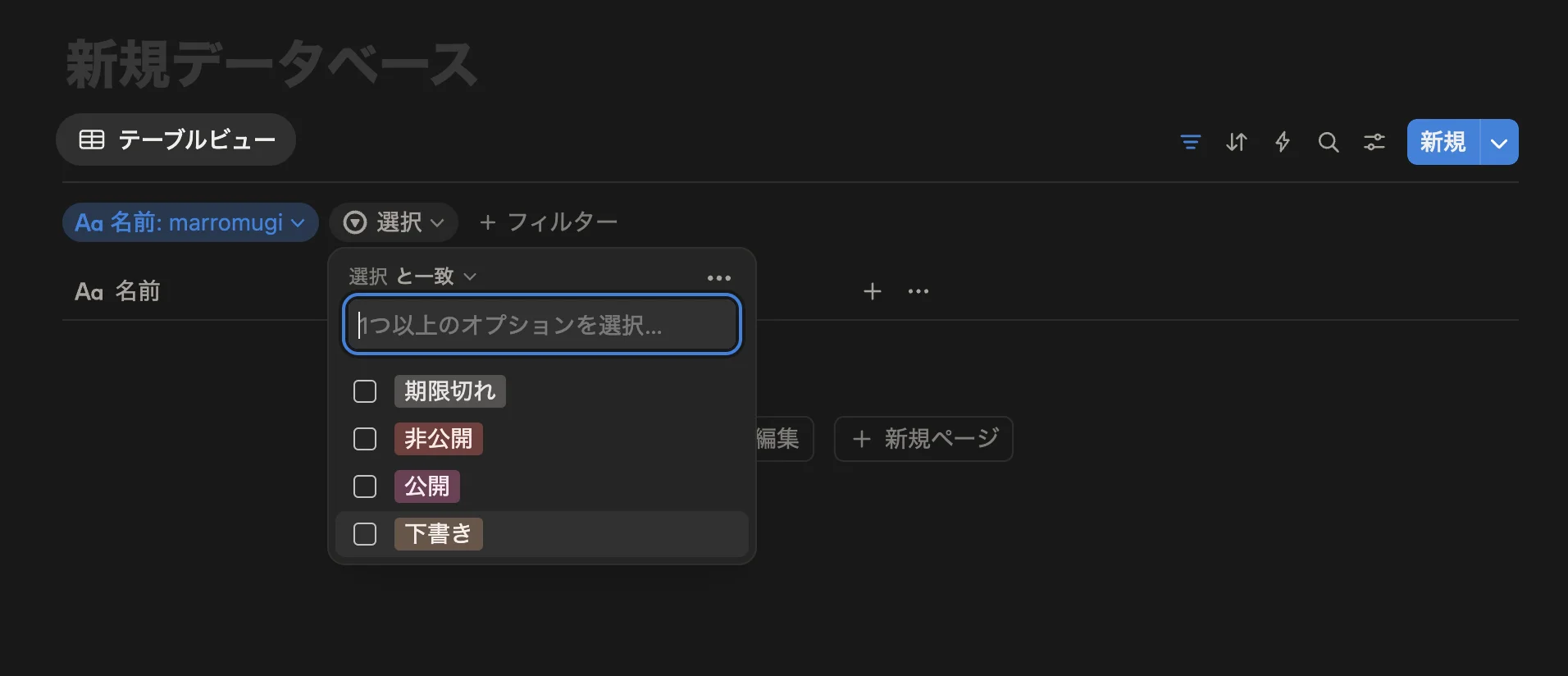
In this article, I'll implement types and utilities in TypeScript to build that filter in a type-safe manner.
First, the Completed Interface
This time, we'll define a filter schema and build the filter UI based on that schema. The schema definition will be implemented like this:
export const sampleSchema = {
  email: createFieldHelper.text({
    label: 'Email',
    description: 'Please set your account email address',
    validate: (value: string) => {
      const emailRegex = /^[^\s@]+@[^\s@]+\.[^\s@]+$/
      if (!emailRegex.test(value)) {
        return { result: false, message: 'Please enter a valid email address' }
      }
      return { result: true }
    },
  }),

  status: createFieldHelper.select<'active' | 'inactive' | 'pending'>({
    label: 'Status',
    description: 'Please set your account status',
    disabled: false,
    options: [
      { label: 'Active', value: 'active' },
      { label: 'Inactive', value: 'inactive' },
      { label: 'Pending', value: 'pending' },
    ],
  }),

  dateRange: createFieldHelper.custom<{ start: Date; end: Date }>()({
    type: 'customDateRange', // You can also set custom types
    label: 'Date Range',
    description: 'Please set the account validity period',
    meta: {
      minDate: new Date('2020-01-01'),
      maxDate: new Date('2025-12-31'),
      format: 'YYYY-MM-DD',
    },
  }),
}

const allFields = getAllFields(sampleSchema) // Get all fields as an array
const field = getField(sampleSchema, 'customDateRange') // Get a specific field

type SampleFilterSchema = typeof sampleSchema

/**
 * type SampleFilterValues = {
    email?: string | undefined;
    status?: "active" | "inactive" | "pending" | undefined;
    dateRange?: {
        start: Date;
        end: Date;
    } | undefined;
}
*/
type SampleFilterValues = FilterValue<SampleFilterSchema>

/**
 * type SampleFilterTypes = "text" | "select" | "customDateRange"
 */
type SampleFilterTypes = FilterType<SampleFilterSchema>
Base Type Definitions
Base Field
First, let's implement the schema types. We'll define parameters that are commonly used across schema fields.
type FilterBaseField<T> = {
  type: string // override with union type
  label: string
  description?: string
  disabled?: boolean
  _value?: T // parameter to get value type
}
Hmm, _value feels a bit awkward, but we'll keep it to keep the implementation simple.
Here's what each is used for:
| Parameter | Details |
|---|---|
| Used to determine which filter UI to display | |
| Set when you don't want to display this filter | |
| For UI display | |
| A type for retrieving the field's type at type level |
By extending FilterBaseField, let's create some fields. I've defined four commonly used ones: text / select / radio / check.
export type FilterTextField = FilterBaseField<string> & {
  type: 'text'
  validate?: (
    value: string
  ) => { result: true } | { result: false; message: string }
}

export type FilterSelectField<T> = FilterBaseField<T> & {
  type: 'select'
  options: { label: string; value: T }[]
}

export type FilterRadioField<T> = FilterBaseField<T> & {
  type: 'radio'
  options: { label: string; value: T }[]
}

// eslint-disable-next-line @typescript-eslint/no-explicit-any
export type FilterCheckField<T extends Array<any>> = FilterBaseField<T> & {
  type: 'check'
  options: { label: string; value: T[number] }[]
}
We add the necessary parameters for each, such as string validation and options for selection types.
Custom Field
By defining fields this way, we can create appropriate fields for each use case. As a convenient type, let's also create a custom field type.
export type FilterCustomField<
  Type extends string,
  Value,
  Meta extends Record<string, unknown>,
> = Omit<FilterBaseField<Value>, 'type'> & {
  type: Type
  meta: Meta
}
For custom fields, we have three generics: Type / Value / Meta.
Here's what each is for:
| Generic | Details |
|---|---|
| The type value | |
| The type of data this field holds | |
| An object for custom parameters or functions |
Schema & Value
Let's define schema types using these types. This is intended for use when you want to set a schema as a function argument. We'll also make it possible to get the type of values that can be retrieved from the schema.
export type FilterField =
  | FilterTextField
  | FilterSelectField<unknown>
  | FilterRadioField<unknown>
  | FilterCheckField<unknown[]>
  | FilterCustomField<string, unknown, Record<string, unknown>>

export type FilterSchema = Record<string, FilterField>

export type FilterValue<T extends FilterSchema> = Partial<{
  [key in keyof T]: T[key]['_value']
}>

export type FilterType<T extends FilterSchema> = T[keyof T]['type']

// Example
type SampleFilterSchema = typeof sampleSchema // The schema from earlier

/**
 * type SampleFilterValues = {
    email?: string | undefined;
    status?: "active" | "inactive" | "pending" | undefined;
    dateRange?: {
        start: Date;
        end: Date;
    } | undefined;
}
 */
type SampleFilterValues = FilterValue<SampleFilterSchema>

// type SampleFilterTypes = "text" | "select" | "customDateRange"
type SampleFilterTypes = FilterType<SampleFilterSchema>
Implementing Field Creation Helpers
Currently, you can define the schema like this:
const schema = {
  email: {
    type: 'text',
    label: 'Email',
    description: 'Enter your email address',
    validate: (value: string) => {
      const emailRegex = /^[^\s@]+@[^\s@]+\.[^\s@]+$/
      if (!emailRegex.test(value)) {
        return { result: false, message: 'Please enter a valid email address' }
      }
      return { result: true }
    },
    // _value: string // Doesn't need to be defined, but can be & appears in editor autocomplete
  } satisfies FilterTextField,
} satisfies FilterSchema
However:
_value, which developers don't define, is visibleHaving to write
typeevery time is redundant (onceFilterTextFieldis specified,typebeing "text" is obvious)
For these two reasons, it would be clearer if these two parameters were automatically added for us. We'll solve this issue by implementing helper functions.
Base Field Helper
export type FilterFieldConfig<T extends FilterField> = Omit<
  T,
  'type' | '_value'
>

export const createFieldHelper = {
  text: (config: FilterFieldConfig<FilterTextField>): FilterTextField => ({
    type: 'text',
    ...config,
  }),

  select: <T = string>(
    config: FilterFieldConfig<FilterSelectField<T>>
  ): FilterSelectField<T> => ({
    type: 'select',
    ...config,
  }),

  radio: <T = string>(
    config: FilterFieldConfig<FilterRadioField<T>>
  ): FilterRadioField<T> => ({
    type: 'radio',
    ...config,
  }),

  check: <T = string>(
    config: FilterFieldConfig<FilterCheckField<T[]>>
  ): FilterCheckField<T[]> => ({
    type: 'check',
    ...config,
  }),
}
We exclude _value and type mentioned above so they're not visible to implementers (except for custom fields).
We also define the FilterFieldConfig type for exclusion and pass it to each field's arguments.
Then you can implement it like this:
const schema = {
  email: createFieldHelper.text({
    label: 'Email',
    description: 'Enter your email address',
    validate: (value: string) => {
      const emailRegex = /^[^\s@]+@[^\s@]+\.[^\s@]+$/
      if (!emailRegex.test(value)) {
        return { result: false, message: 'Please enter a valid email address' }
      }
      return { result: true }
    },
  }),
} satisfies FilterSchema
It's a bit cleaner than before.
No need to define
typeEditor inference works without specifying types with
satisfies
These are nice benefits.
Custom Field Helper
Custom fields use a slightly special syntax.
Custom fields need to receive the type to use as _value via generics.
So we can define it like this:
export const createFieldHelper = {
  custom: <
    Value,
    Type extends string,
    Meta extends Record<string, unknown>,
  >(config: {
    type: Type
    label: string
    description?: string
    disabled?: boolean
    meta?: Meta
  }): FilterCustomField<Type, Value, Meta> =>
    ({
      ...config,
      meta: config.meta ?? {},
    }) as FilterCustomField<Type, Value, Meta>,
}
This definition is fine, but there's an issue: you need to define all three types in the generics.
Ideally, Meta and Type should be automatically inferred from custom's arguments. To solve this problem, although it feels a bit awkward, we create a function that wraps the current implementation and only takes Value as a generic.
export const createFieldHelper = {
  custom:
    <Value = unknown>() =>
    <Type extends string, Meta extends Record<string, unknown>>(config: {
      type: Type
      label: string
      description?: string
      disabled?: boolean
      meta?: Meta
    }): FilterCustomField<Type, Value, Meta> =>
      ({
        ...config,
        meta: config.meta ?? {},
      }) as FilterCustomField<Type, Value, Meta>,
}
By doing this, we can take Value via generics while having Type and Meta automatically inferred from the arguments. Here's how to use it:
const schema = {
  dateRange: createFieldHelper.custom<{ start: Date; end: Date }>()({
    type: 'dateRange',
    label: 'Date Range',
    description: 'Select a date range',
    meta: {
      minDate: new Date('2020-01-01'),
      maxDate: new Date('2025-12-31'),
      format: 'YYYY-MM-DD',
    },
  }),
} satisfies FilterSchema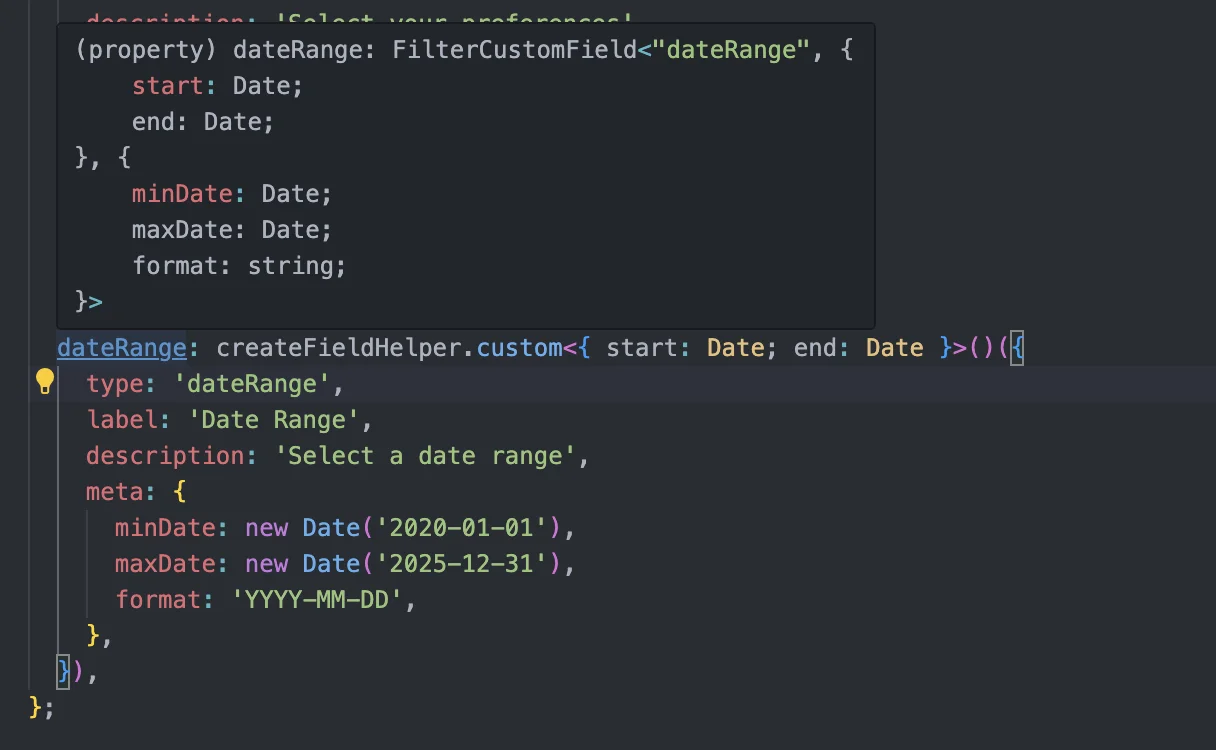
Implementing Field Retrieval Utilities
There's likely some need to retrieve specific fields from a schema or get the whole thing as an array, so let's implement that. The interface will be something like this:
getAllFieldsto get all schema fields as an arraygetFieldto get a specific field
We'll define these two:
const allFields = getAllFields(sampleSchema)
const field = getField(sampleSchema, 'dateRange')
When getting as an array, you'll also want to get each field's key. There will be cases where you want to change processing based on id while iterating through the array. So, let's define a type that includes id for existing fields.
export type IdentifiableFilterField<
  T extends FilterField = FilterField,
  K extends string = string,
> = {
  id: K
} & T
OK. Let's implement getField first.
getField
export function getField<S extends FilterSchema, K extends keyof S & string>(
  schema: S,
  key: K
): IdentifiableFilterField<S[K], K> {
  return {
    id: key,
    ...schema[key],
  }
}
K is keyof S & string to not allow other types like number. FilterSchema is defined as Record<string, FilterField>, so it should only allow strings, but for some reason number and such can still be retrieved, so we add & string as a countermeasure.
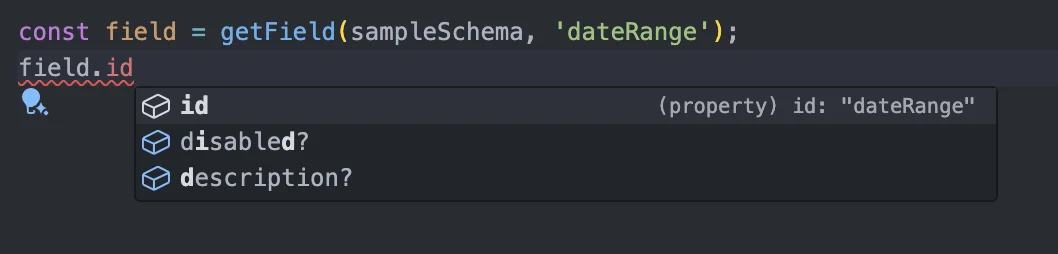
⬆ Great that id is properly a literal
Finally, let's implement getAllFields.
getAllFields
export function getAllFields<S extends FilterSchema>(
  schema: S
): {
  [K in keyof S]: IdentifiableFilterField<S[K], K & string>
}[keyof S][] {
  return Object.keys(schema).map((key) => getField(schema, key))
}
The return type is a bit hard to understand, but this implementation allows us to identify which field it is when specifying id. If implemented like below, we can't get which field it is when branching on id.
export function getAllFields<S extends FilterSchema>(
  schema: S
): IdentifiableFilterField<S[keyof S], keyof S & string>[] {
  return Object.keys(schema).map((key) => getField(schema, key))
}

export const schema = {
  email: createFieldHelper.text({
    label: 'Email',
    description: 'Please set your account email address',
    validate: (value: string) => {
      const emailRegex = /^[^\s@]+@[^\s@]+\.[^\s@]+$/
      if (!emailRegex.test(value)) {
        return { result: false, message: 'Please enter a valid email address' }
      }
      return { result: true }
    },
  }),

  status: createFieldHelper.select<'active' | 'inactive' | 'pending'>({
    label: 'Status',
    description: 'Please set your account status',
    disabled: false,
    options: [
      { label: 'Active', value: 'active' },
      { label: 'Inactive', value: 'inactive' },
      { label: 'Pending', value: 'pending' },
    ],
  }),
}

const fields = getAllFields(schema)

for (const field of fields) {
  if (field.id === 'email') {
    const { result } = field.validate() // Error: Property 'validate' does not exist on type...
  }
}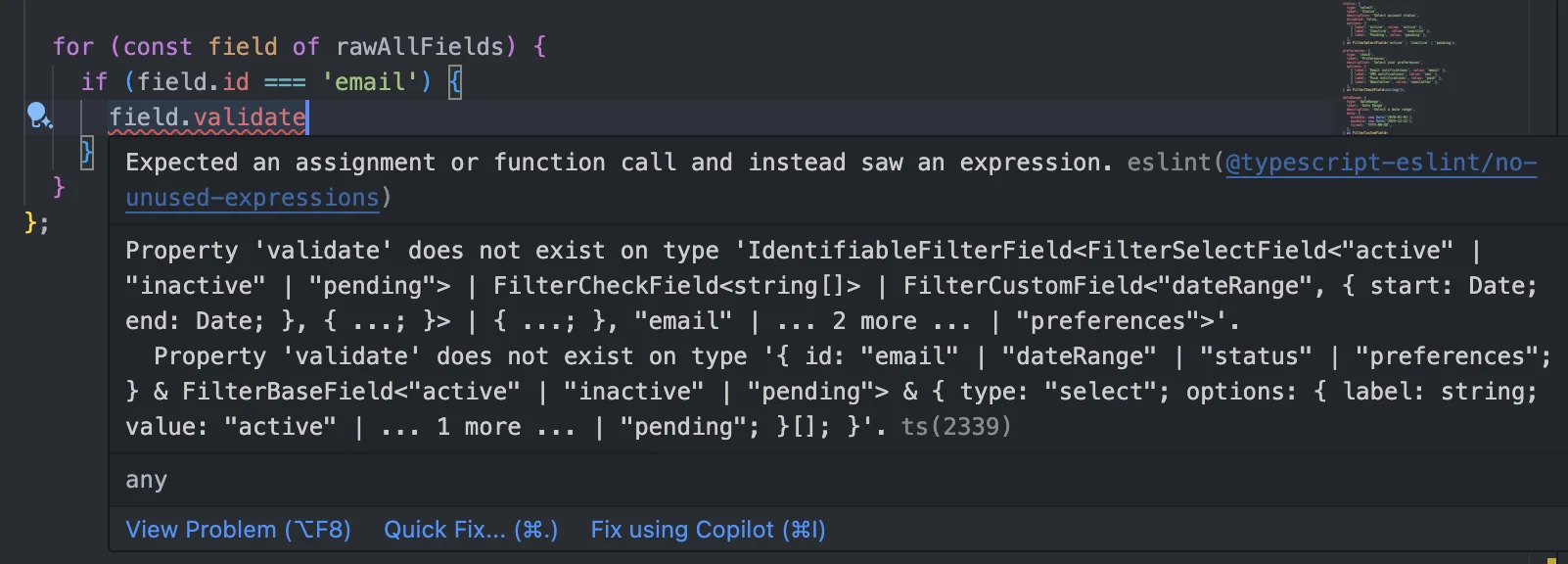
To solve this, by:
Mapping fields by key
Getting the mapped fields and storing them in an array
we can identify fields based on id.
export function getAllFields<S extends FilterSchema>(
  schema: S
): {
  [K in keyof S]: IdentifiableFilterField<S[K], K & string>
}[keyof S][] {
  return Object.keys(schema).map((key) => getField(schema, key))
}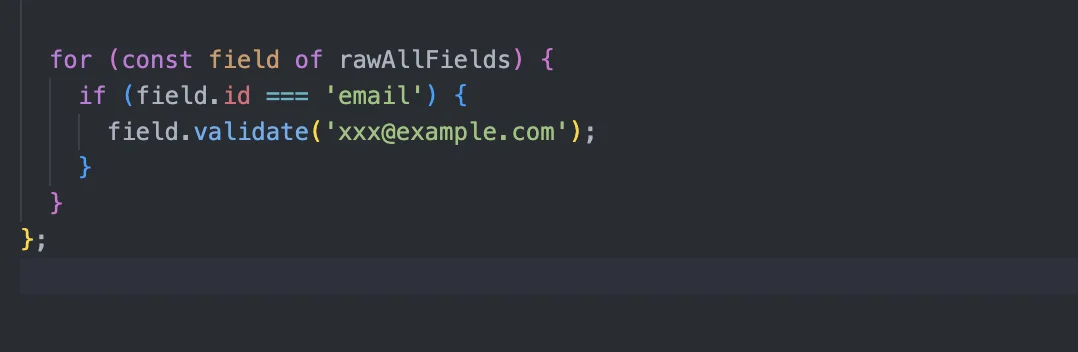
⬆ We can now branch on id and get the contents
Conclusion
In this article, we implemented the type system for the filter UI. With this, you should be able to display UI from the defined schema, get filter setting values, and do quite a bit. In future articles, I'll try implementing React components using these types and utilities. Thank you for reading 🙏